Test F: Driver's Window Inoperative
- Connect New Generation Star (NGS) tester to Data Link Connector (DLC). Using NGS tester, perform Driver's Door Module (DDM) self-test. If DTCs B1405 or B1408 are retrieved, go to next step. If neither DTC B1405 or B1408 is retrieved, go to step 4
.
- Ensure ignition switch is in LOCK position. Remove driver's control switch. Perform DRIVER'S CONTROL SWITCH
test under COMPONENT TESTS. If switch is okay, go to next step. If switch is faulty, replace driver's control switch and retest system operation.
- Turn ignition switch to LOCK position. Disconnect DDM 26-pin harness connector C501d. Turn ignition switch to RUN position. Measure voltage between driver's control switch 16-pin harness connector C504 terminal No. 6 (Yellow/Red wire) and ground. See Figure
. Measure voltage between driver's control switch 16-pin harness connector C504 terminal No. 7 (Yellow/Blue wire) and ground. If any voltage is greater than 10 volts, repair short to power in appropriate wire and go to step 6
. If voltages are less than 10 volts, replace DDM and retest system operation.
- Turn ignition switch to LOCK position. Ensure NGS tester is properly connected. Turn ignition switch to RUN position. Using NGS tester, select DDM active command FRONT WINDOW CONTROL. Trigger DR UP to ON then OFF. Trigger DR DOWN to ON then OFF. If driver's window raises and lowers, go to next step. If driver's window does not raise and lower, go to step 9
.
- Using NGS tester, monitor the DDM PIDs D_UP_SW and D_DN_SW while operating driver's control switch to UP and DOWN positions. If DDM PIDs agree with driver's control switch positions, replace DDM and retest system operation. If DDM PIDs do not agree with driver's control switch positions, go to next step.
- Turn ignition switch to LOCK position. Remove driver's control switch. Perform DRIVER'S CONTROL SWITCH
test under COMPONENT TESTS. If switch is okay, go to next step. If switch is faulty, replace driver's control switch and retest system operation.
- Disconnect DDM 26-pin harness connector C501d. Measure resistance in Yellow/Red wire between driver's control switch 16-pin harness connector C504 terminal No. 6 and DDM 26-pin harness connector C501d terminal No. 20. See Figure
and Figure
. Measure resistance in Yellow/Blue wire between driver's control switch 16-pin harness connector C504 terminal No. 7 and DDM 26-pin harness connector C501d terminal No. 19. If resistances are less than 5 ohms, go to next step. If any resistance is greater than 5 ohms, repair open in appropriate wire and retest system operation.
- Measure resistance between driver's control switch 16-pin harness connector C504 terminal No. 6 (Yellow/Red wire) and ground. Measure resistance between driver's control switch 16-pin harness connector C504 terminal No. 7 (Yellow/Blue wire) and ground. If resistances are greater than 10 k/ohms, replace DDM and retest system operation. If any resistance is less than 10 k/ohms, repair short to ground in appropriate wire and retest system operation.
- Turn ignitions switch to LOCK position. Remove fuse No. 420 (20-amp) from Battery Junction Box (BJB). Turn ignition switch to RUN position. Measure voltage between BJB fuse No. 420 input terminal and ground. If voltage is greater than 10 volts, go to next step. If voltage is less than 10 volts, repair BJB fuse No. 420 input circuit and retest system operation. See POWER DISTRIBUTION article in WIRING DIAGRAMS.
- Turn ignition switch to LOCK position. Disconnect driver's window motor harness connector C524. Turn ignition switch to RUN position. Using NGS tester, select DDM active command FRONT WINDOW CONTROL. Measure voltage between ground and White wire at driver's window motor harness connector C524 while triggering DR DOWN to ON. Record results. Measure voltage between ground and Yellow wire at driver's window motor harness connector C524 while triggering DR UP to ON. If voltages are greater than 10 volts when commanded ON, go to next step. If any voltage is less than 10 volts when commanded ON, go to step 12
.
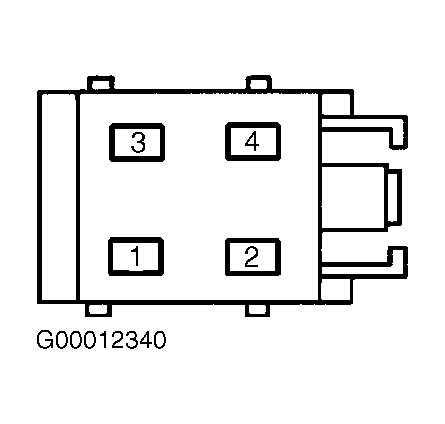
- Turn ignition switch to LOCK position. Disconnect DDM 4-pin harness connector C501b. Measure resistance between DDM 4-pin harness connector C501b terminal No. 3 (Black wire) and ground. See Fig 1
. If resistance is less than 5 ohms, replace driver's window motor and retest system operation. If resistance is greater than 5 ohms, repair open in Black wire and retest system operation.
- Turn ignition switch to LOCK position. Disconnect DDM 4-pin harness connector C501b. Turn ignition switch to RUN position. Measure voltage between DDM 4-pin harness connector C501b terminal No. 4 (Red wire) and ground. See Fig 1
. If voltage is greater than 10 volts, go to next step. If voltage is less than 10 volts, repair open in Red wire and retest system operation.
- Turn ignition switch to LOCK position. Measure resistance in White wire between driver's window motor harness connector C524 and DDM 4-pin harness connector C501b terminal No. 1. Measure resistance in Yellow wire between river's window motor harness connector C524 and DDM 4-pin harness connector C501b terminal No. 2. If resistances are less than 5 ohms, replace DDM and retest system operation. If any resistances is greater than 5 ohms, repair open in appropriate wire and retest system operation.
 Courtesy of FORD MOTOR CO.